Timestamp Camera
- 4.6
- Rating
- 50.00M
- Installs
- Free
- Price

 Analysis by App-foxy
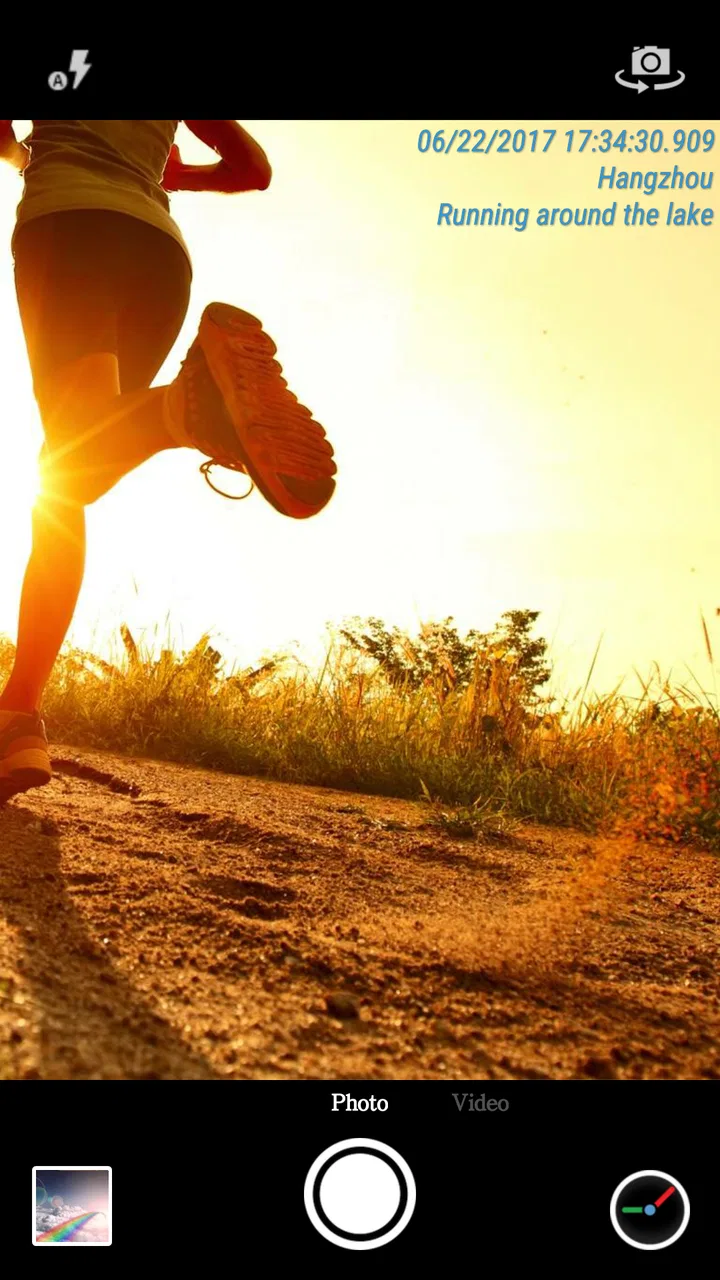
I first noticed Timestamp Camera because it solves a very specific problem without asking me to rebuild my entire photo workflow. Instead of taking a picture and later trying to remember when or where it was made, I can capture the moment with a visible date and time watermark already placed on the image or video. That makes it especially useful for records, deliveries, travel notes, field work, family memories, and any situation where the timing matters as much as the picture itself.
It is a free photography app from Bian Di, available for everyone to use. The app has been around since March 26, 2015, and its long presence is reflected in its broad audience: it has passed 50 million installs, with an average score of 4.6 from roughly 383 thousand ratings and about 3.3 thousand written reviews. Those figures do not automatically make it perfect, but they do suggest that the simple timestamp idea has remained useful to a lot of people.
How Timestamp Camera feels in everyday use
My main impression is that this is a utility disguised as a camera. The ordinary camera app on a phone is usually designed to keep the image clean, attractive, and easy to edit later. Timestamp Camera takes the opposite approach. It treats the date and time as part of the captured record, so the information is visible at the moment of creation rather than hidden in file details that may be difficult to find or may disappear when an image is shared or converted.
You May Also Like

 Blood Strike: 2.5 Anniversary
Blood Strike’s Loadouts Turn Every Drop Into a Tactical Gamble
A close look at Blood Strike’s custom loadouts: how fast access to signature weapons reshapes its battle royale rhythm, rewards preparation, and narrows the gap between fights.

 Pandora - Music & Podcasts
Pandora’s Music Is Easy to Start, but Harder to Recover
Pandora’s strength is its low-effort path from a seed to a station. Its weak spot is how much confidence it asks you to place in connection, setup, and quiet recovery.

 8 Ball Pool
 Is Built on Rivalries, Rematches, and Routine
A close look at the rivalries, rematches, shared routines, and unanswered safety questions that turn a quick pool match into a persistent mobile community.

 Samsung Music
’s Quiet Strength Is Playing What You Already Own
Its reach comes less from spectacle than from dependable access to a personal library. That simplicity is both the app’s strongest retention engine and its ceiling.

 AccuWeather: Weather Radar
AccuWeather Review: A Quick, Clear Forecast for Everyday Decisions
For everyday plans, the best forecast is the one you can understand quickly. AccuWeather makes rain timing, radar, and local conditions easy to act on, with a few trade-offs.

 Hill Climb Racing
Why Hill Climb Racing Still Turns Crashes Into One More Run
A tiny car, a bumpy hill and one more upgrade: Hill Climb Racing keeps resurfacing because its simple chaos makes every near-miss feel personal.
More From Our News Desk
View All News


That distinction matters in practical situations. Imagine receiving a package and wanting a quick visual record of its condition, documenting a meter reading, photographing work completed at a property, or recording the start of a trip. With a normal camera, I would need to depend on the file's metadata or add a note afterward. Here, the visible mark is immediately understandable to anyone who sees the image, even if the file is forwarded through a messaging app or printed.
The same idea works for video. A timestamp placed directly on footage can make a sequence easier to organize when several clips are taken during a long day. I can see why this appeals to people who keep visual logs rather than simply taking pictures for a gallery. It is also helpful when the recipient of a photo is not the person who took it and should not have to inspect technical file information to understand when it was recorded.
The trade-off is just as clear: the watermark becomes part of the visible composition. If I am photographing a landscape, a portrait, or anything I may want to crop creatively later, the date and time can feel intrusive. I would not use this as my only camera for important artistic shots. I would use it when the record itself is the priority, then switch back to my regular camera for images where a clean frame matters more.
A useful workflow for records and proof
One of the less obvious strengths is how it changes the handoff process. A timestamp inside the picture is easier to understand than a filename, and it remains visible when an image is copied into a report or sent to someone who does not use the same phone. For a small business owner, that can make a sequence of site photos easier to review. For a traveler, it can separate morning and evening scenes without opening each file's information panel.
I would still avoid treating a visible timestamp as a complete guarantee of authenticity. A watermark tells the viewer what the app displayed when the capture was made; it is not the same thing as a formal audit trail or professional evidence system. That nuance is important if the images will be used for a dispute, official inspection, or any process with strict documentation requirements. For ordinary personal records and informal work documentation, however, the clarity is genuinely useful.
A good habit is to decide before shooting whether the image is for documentation or presentation. For documentation, I would leave the timestamp prominent and keep the original files organized in a dedicated album or folder. For presentation, I would use the phone's usual camera and, if necessary, add a date later in an editor. Mixing both purposes in one camera stream can become frustrating because the watermark is not something I can simply wish away after the shot has been taken.
Where it fits beside the usual camera and editing apps
The standard camera app remains better when I want the phone's familiar image processing, a clean frame, and the least possible setup. It is also the safer choice for important personal photos where I may later want to crop, print, or edit without a permanent overlay. Timestamp Camera earns its place when I want the date and time to be visible immediately, not merely stored somewhere in the file.
A photo editor can add text after capture, which offers more control over placement, style, and timing. That approach is preferable when I am preparing a polished report or selecting only a few images for publication. The disadvantage is the extra work: I must remember to edit, enter the right information, and keep the process consistent across a batch of photos. Capturing the mark at the source is faster and reduces that administrative step.
There is also a difference between a timestamp and a calendar note. A note may explain what happened, while the watermark only identifies when the image was made. I find the app strongest when the visual record is self-explanatory or when the date and time are the details most likely to be questioned. If I need project names, descriptions, signatures, or a chain of custody, I would combine the photos with a separate documentation system rather than expecting this camera to do everything.
Small decisions that make the app more useful
The first decision I would make is placement. A timestamp over a bright subject can reduce readability, while a mark near an edge may be easier to live with but more vulnerable to cropping. Before starting a long series, I would take a test image against both a light and a dark background. That quick check helps me avoid discovering halfway through a job that the text is hard to read or covers the important part of the frame.
The second is consistency. If I am documenting several rooms, deliveries, or stages of a task, I would keep the same framing and timestamp position throughout the session. Consistency makes the resulting set easier to compare. It also prevents the common problem of having some images that clearly show the date while others place it over the subject or at a different visual scale.
The third is separating capture from editing. I would not rely on the timestamped image as the only copy of a valuable photograph. For an important event or a record that may need later cropping, I would capture a clean version with the normal camera and a timestamped version with this app when practical. That two-image approach takes a little more storage, but it preserves flexibility while still giving me a clearly marked reference.
For video, I would plan the shot before pressing record. A visible date and time can be helpful in a continuous sequence, but it can also distract from faces, signs, or other details if it sits in the wrong place. Short test clips are worthwhile, particularly when the footage will be watched on a different screen. What looks readable on a phone may feel too small on a larger display, while an oversized mark can dominate a simple scene.
Who will get the most value from it
I think this app is a strong match for people who document rather than decorate. That includes anyone keeping a visual diary of repairs, deliveries, home projects, travel stages, equipment condition, or routine inspections. It can also suit parents who want a quick chronological record of a child's activities, provided they are comfortable with the date and time being visible whenever the image is shared.
It is useful for occasional users too because the purpose is easy to understand. I do not need to learn a complicated editing workflow just to produce a marked photo. The app's focus keeps the decision simple: open it when the capture time should be seen, and use another camera when it should remain invisible.
I would be more cautious about recommending it to photographers who care about composition, people who frequently print images, or anyone who expects advanced creative controls from a camera app. A permanent overlay can limit later use, and the app's value decreases sharply when the timestamp is something I would remove before sharing. It is also not the right answer for formal evidence requirements that demand more than a visible date and time.
What the app's long life suggests
Timestamp Camera was released in 2015, which gives it a different character from newer apps built around social filters, artificial intelligence, or elaborate editing. Its appeal comes from a narrow function that remains understandable years later. The current evidence of its large install base and strong average rating suggests that the basic workflow continues to meet a real need, rather than depending only on a short-lived trend.
At the same time, longevity should not be confused with constant reinvention. The important question for an existing user is whether the app still fits the way they work today. Phones now make it easy to share, edit, and organize media in many ways, so a timestamped capture is most valuable when the visible record survives those later steps. If my workflow already includes a reliable reporting tool or a camera that handles the same task more cleanly, the reason to switch becomes smaller.
For someone returning after a long break, I would approach it as a focused tool rather than expecting a completely new photography platform. Its identity is still tied to marking photos and videos at capture time. That stability is good when I want a predictable result, but it may feel limited if I am looking for a broad creative camera with extensive controls.
Privacy, sharing, and the cost of convenience
Because the date and time are visible, every shared image can reveal more than I may intend. A photo taken at home can disclose when I was there, and a series of images can reveal a routine. Before sending a timestamped picture publicly, I would ask whether the exact capture time is useful to the recipient or merely extra information. For private records, that detail is often the point; for public posts, it may be unnecessary.
The free price makes experimenting easy, but free does not remove the need for judgment. I would test the app with non-sensitive images first, learn how the watermark looks in the situations I care about, and only then use it for personal documentation. I would also keep in mind that a visible timestamp is convenient precisely because it travels with the image, so removing that information later may require cropping or editing and can damage the composition.
That is why I see the app as part of a workflow, not a replacement for one. The camera creates a readable visual marker; I still need to name files, sort albums, back up important material, and decide who should receive it. Those surrounding habits determine whether the app saves time or simply produces a larger collection of marked images that is difficult to search.
What I would like users to watch for
Before committing to a large batch, I would watch how the watermark behaves across still photos and video, especially at the edges of the frame. I would also check readability in low light and against busy backgrounds. These are not minor details when the timestamp is the reason for using the app: a mark that cannot be read defeats much of the purpose.
I would also pay attention to whether the app continues to match my phone and sharing habits over time. A useful camera tool should fit comfortably into the way I save and send media. If I increasingly need location labels, project notes, signatures, or a clean original alongside every marked copy, I may be better served by combining the app with another tool or choosing a more specialized documentation solution.
My final advice is straightforward. Install it if you regularly need photos or videos that announce when they were captured, and use it deliberately for those jobs. Keep your normal camera for creative images, important portraits, and anything that may need flexible editing later. The best result comes from treating the timestamp as part of the record, not as decoration.
After using it in that role, I find Timestamp Camera easy to recommend to the right person. It is free, familiar, and focused, with enough practical value to explain its enduring popularity. It will not replace a full camera editor or a formal evidence platform, but it does one everyday task clearly: it puts the capture time where people can see it. For deliveries, logs, trips, repairs, and personal records, that directness can be more useful than a long list of extra photographic features.
FAQs for Timestamp Camera
01What features does Timestamp Camera offer?
Timestamp Camera allows users to add timestamps to photos and videos in real-time. It supports many formats, including date, time, and location, and offers customization options such as font, color, and size. Users can also add custom text, logos, and GPS coordinates. The app is versatile for both casual and professional use.
02Is Timestamp Camera suitable for professional use?
Yes, Timestamp Camera is ideal for professional use, particularly for those in fields like journalism, law enforcement, and construction. The app provides accurate and customizable timestamps, which can be crucial for documentation and record-keeping. Its ability to add GPS coordinates and custom logos enhances its utility for professionals.
03Does Timestamp Camera affect photo and video quality?
Timestamp Camera maintains the original quality of your photos and videos while adding timestamps. It offers high-resolution output and supports various photo and video formats. Users can adjust settings to ensure that the timestamps do not interfere with the image quality, making it suitable for high-definition content.
04Is Timestamp Camera user-friendly for beginners?
Yes, Timestamp Camera is designed with a user-friendly interface, making it accessible for beginners. The app features intuitive controls, and most functions can be easily accessed and understood without a steep learning curve. Users can quickly customize settings to suit their needs, making it simple to use right from the start.
05What permissions does Timestamp Camera require?
Timestamp Camera requires permissions to access your camera and photo gallery to function effectively. Additionally, it may request location access to add GPS coordinates to your media. These permissions are standard for apps of this nature, and users have control over what information is shared and used by the app.
Pros
- Highly customizable timestamps.
- Supports various camera modes.
- Easy to use interface.
- Real-time location tagging.
- Frequent app updates.
Cons
- Ads in free version.
- Limited features without purchase.
- Occasional bugs in older devices.
- Watermark on free version photos.
- Requires location permissions.

Timestamp Camera
Gallery